Catch the SaaS logins your identity provider never issued
By CAPPZ.AI ·
A forged SAML login looks valid to the SaaS, but your identity provider never issued it. The open-source CAPPZ SDK now finds those sessions from two log exports, with no change to the SaaS, and adds a SAML Guard that refuses ambiguous logins before your own apps see them.
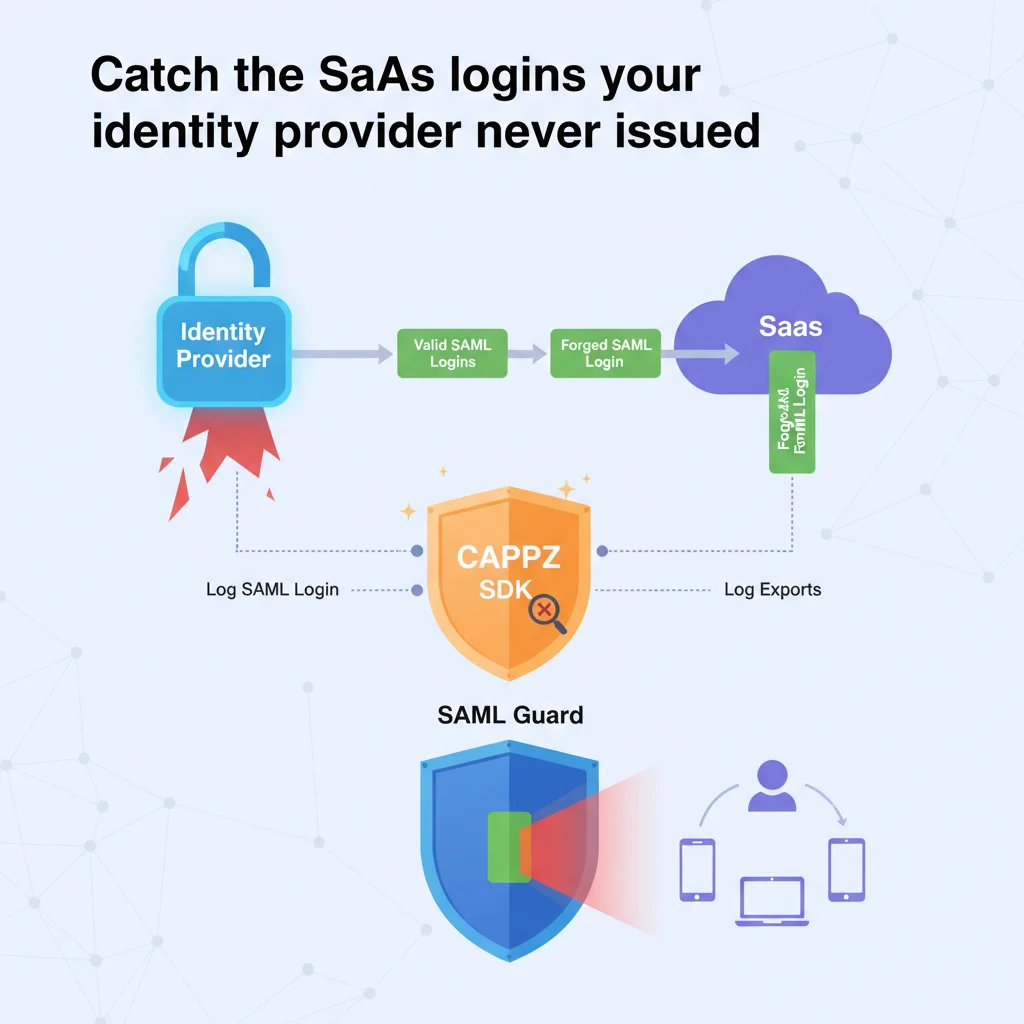
Single sign-on has a weak spot that keeps coming back. Your identity provider (Okta, Microsoft Entra, ADFS or another) signs a SAML assertion saying who you are. The SaaS application receives it, checks it, and lets you in. If the SaaS's check is incomplete, an attacker can send it something that looks like a valid assertion, and the SaaS will open a session for whoever the attacker names. Your identity provider was never involved.
This isn't rare. SAML authentication bypasses were published again and again in 2025 and 2026, in open-source SAML libraries, in commercial products and in plugins. Almost none of them broke the cryptography. They fall into two groups:
- Two parsers disagree. The code that checks the signature reads one part of the XML, and the code that logs the user in reads another. Signature wrapping, namespace tricks and a comment hidden inside a user name all work this way.
- The signature is checked, the rest is not. The SaaS confirms the assertion was signed by a trusted identity provider, but never checks that it was meant for this application, for this login attempt, and only once.
If the vulnerable code runs at your SaaS provider, there is nothing you can patch. What you can do is notice, quickly, and refuse the same trick on the applications you run yourself. The open-source CAPPZ SDK (version 15.36) now does both.
1. Find logins your identity provider never issued
Every legitimate SSO session starts with your identity provider issuing an assertion. A forged one doesn't. Both sides keep logs: your identity provider records what it issued, and almost every SaaS application keeps an audit log of logins. Put the two side by side, and a forged login shows up as a SaaS session with no matching issuance.
The new reconciliation tool does exactly that, from two exports:
- What your identity provider issued. It reads Okta System Log and Microsoft Entra sign-in exports directly, and any other CSV or JSON export by naming its columns.
- What the SaaS let in. It reads the SaaS audit log export, again by naming its columns.
Each SaaS login is matched to an issuance for the same person and application, in the few minutes before the login. Every login gets one of these results:
- Matched: the identity provider issued an assertion for it.
- Orphan: a session your identity provider never issued. This is the signal. Revoke the session and investigate.
- Reused: one assertion started two sessions, which means a replay.
- Gap: an application with no issuance at all in the period, or a login outside the time the export covers. Gaps are reported as gaps, never quietly counted as clean.
It runs on a laptop, on a timer on a CAPPZ edge node, or in a CI job. Nothing is sent anywhere, and nothing changes at the SaaS or the identity provider. The exit code tells a script whether there were findings, and the report carries a fingerprint, so an incident record can cite exactly the evidence it was based on.
An attacker who can forge logins may also try to clean up logs. For that case, an edge node can seal what the identity provider issued as it arrives. Each batch is signed, chained to the one before it, and stores only a salted fingerprint of each user name, never the name itself. If a batch is removed or a record is edited later, the check fails.
2. Refuse ambiguous logins in front of your own apps
For the SAML applications you host, or can put a proxy in front of, the CAPPZ edge node now includes SAML Guard. It sits in front of the application's login endpoint and makes a second, independent check before the application's own SAML code sees anything. It doesn't try to interpret ambiguous XML. It refuses it:
- One assertion, in one place. No document type definitions, entities, comments or hidden extra sections, no duplicate IDs, and no namespace prefix that means two things.
- Signatures that point at what they sign, using SHA-256 or stronger.
- A pinned signing certificate. The identity provider's certificate is accepted only if your organization's key has signed a pin for it, with an expiry.
- The assertion is for this application: the right issuer, destination, recipient and audience.
- It is for this login attempt, and fresh: a lifetime of minutes, not hours, and accepted once. The Guard learns which login requests your application actually sent, so it can tell when a response answers a request that was never made.
The Guard does not replace your application's own signature check. Both have to pass, so an attacker now has to fool two different XML parsers. The Guard never passes along anything it cannot read unambiguously.
Like CAPPZ's tools for moving off PHP and off X.509 certificates, the Guard starts in shadow mode. Your application stays in charge, and the Guard records what it would have done. Its report lists every login your application accepted that the Guard would have refused, grouped by reason. Each entry is either a real weakness in the application's SAML setup or a Guard setting to correct, and the report says which group each reason belongs to. When enough traffic has been seen and every finding is explained, the report says the Guard is ready to enforce. From then on, refused logins never reach the application.
3. Where this leads
Each step is optional, and the earlier ones keep working:
- Keep SAML as it is and reconcile logins. Nothing in the login path changes.
- Put SAML Guard in front of the applications you host: shadow first, then enforce.
- For applications you control, bind the session to a device key after a login has passed, and sign each later request with that key. A stolen or replayed assertion is then worth nothing on its own.
Try it
The SDK is open source under Apache-2.0 at github.com/CAPPZ-ai/cappz-sdk. Start with docs/SAML_GUARD.md. The reconciliation tool is packages/cappz-edge-node/tools/saml-reconcile.ts, and the Guard is packages/cappz-edge-node/tools/saml-guard.ts, or --saml on the full edge node. Both run with Deno 2, and no CAPPZ account is needed.
If you were affected by a SAML bypass at a SaaS provider, the reconciliation tool is the place to start. Export a few weeks of your identity provider's sign-ins and the SaaS's login log, and look for orphans.
Topics: saml, single sign-on, identity security, saas security, authentication bypass, incident response, edge node, open source
Version 1 · recorded on the CAPPZ admin chain · content sha256 409e021364568bdb